


Leaderboard
-

N S
Bloggers6Poäng6 139Antal inlägg -

crowfear
Bloggers5Poäng8 778Antal inlägg -

mickel_rääv
Bloggers4Poäng130Antal inlägg -

mbbohman
Bloggers3Poäng7 301Antal inlägg
Popular Content
Showing content with the highest reputation on 2012-10-04 in Inlägg
-
6 points
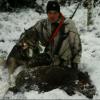 2 pointsKontaktmannen ringde vid 22.00 om en ensam stor gris som va påkörd precis i utkanten på grannbyn, möttes upp där en stund senare, kunde inget hitta på platsen. Regnade otroligt mycket just då, så vi satt sen i bilen o avvaktade en stund, när vi väl började drog båda hundarna i vind redan nere på vägen. Spårade ett par hundra meter, svårt o se om det va grisen, kom fram till en mindre granplantering där vi släppte kompisens jämte. Upptaget kom bara 50 meter ifrån oss, jag gick runt o passade medans kompisen gick på, vet i fan om jag lyckats skjuta med min hund i koppel.. Grisen flyttade en del i planteringen, så kom andre hundföraren ut till mig, hade svårt att få läge i tättingen, han tog då mitt pass o jag gick runt o släppte på även min hund. Stod fast o fint när det blev 2 hundar, så kom in på det direkt, så kom grisen i ett utfall efter hunden o stannade nån meter ifrån mig, så bara o avsluta Va en galt på ca 100 kilo, när jag tog ur den så va bäckenet trasigt, lite blodigt i ena baklåret men tror alla ben va hela.2 points
2 points2 points
2 points
2 pointsKontaktmannen ringde vid 22.00 om en ensam stor gris som va påkörd precis i utkanten på grannbyn, möttes upp där en stund senare, kunde inget hitta på platsen. Regnade otroligt mycket just då, så vi satt sen i bilen o avvaktade en stund, när vi väl började drog båda hundarna i vind redan nere på vägen. Spårade ett par hundra meter, svårt o se om det va grisen, kom fram till en mindre granplantering där vi släppte kompisens jämte. Upptaget kom bara 50 meter ifrån oss, jag gick runt o passade medans kompisen gick på, vet i fan om jag lyckats skjuta med min hund i koppel.. Grisen flyttade en del i planteringen, så kom andre hundföraren ut till mig, hade svårt att få läge i tättingen, han tog då mitt pass o jag gick runt o släppte på även min hund. Stod fast o fint när det blev 2 hundar, så kom in på det direkt, så kom grisen i ett utfall efter hunden o stannade nån meter ifrån mig, så bara o avsluta Va en galt på ca 100 kilo, när jag tog ur den så va bäckenet trasigt, lite blodigt i ena baklåret men tror alla ben va hela.2 points
2 points2 points
2 points 2 pointsJimmy och Galne: Det var exakt vad vi gjorde i förra veckan. Tillsammans med polisen informerade vi för 11:e året i rad på köpcentrum, trafikkontroller, i media mm om denna verksamhet. Vi har också prövat allt ifrån reklamfilm till info på Globens elskyltar för att sprida budskapet. Vi har också genom åren delat ut drygt 5 miljoner viltolycksremsor, bland annat... Så nog har vi informerat.2 points
 1 point1 point
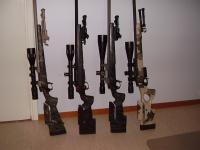
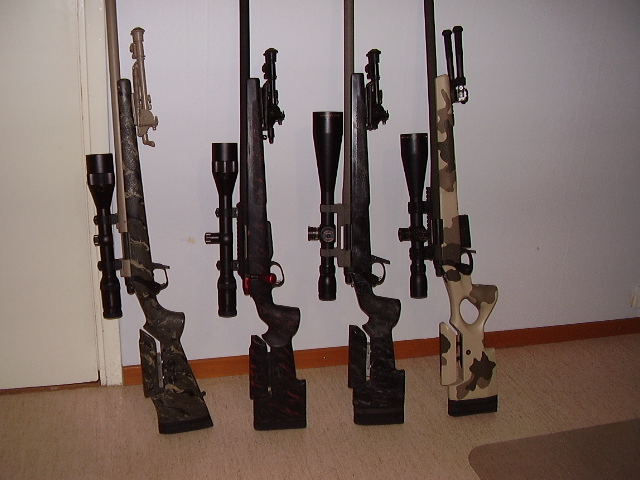
 Kul! Detta med att veta vilken LOP man skall ha är inte lätt så min allra första McMillankolv jag köpte var en A3-5 med deras spacer system för att prova mig fram,liten extrakostnad för att få det riktigt bra,mina två andra beställde jag med fixed LOP när jag hade koll. A3-5 var min allra första kolv och fortfarande är det den jag tycker bäst om,även om den huvudsakligen är tänkt för liggandeskytte så funkar den riktigt bra med improviserade skjutställningar. M40-HTG tycker jag inte du ska döma ut enbart på McM bild,den är större och fylligare än vad den ser ut och är mitt val på min allround jaktbössa,väljer du sen sniper fill så blir den riktigt stadig för liggande skytte,den sluttande undersidan på denna typ av kolvar gör skytte med baksäck lite mer pillrigare men om syftet är ett skott en träff är det ointressant,vidare lämpar dom sig för användning av bakre monopod vilket jag ofta har när jakt står på agendan. Alla kolvar med plan undersida kräver att baksäck,ryggsäck,midjeväska medförs för att få bra stöd på långa håll. Som grädde på moset så har McM många intressanta färgsättningar att erbjuda vilket är nog så viktigt åtminstone för mig,numera kan man ju få molded in camopatterns vilket snart nog kommer få mig att beställa en i Sand camo . Har en dålig bild på en Custom stock lineupp,M40-HTG längst till vänster,två A3-5 i mitten och en Manners T5-A till höger,notera hur M40 storleksmässigt ser ut mot de andra. /Mike
 1 point
 1 pointSka snart ut och gräva gropen till rävåtlen så att den är redo att fyllas på måndag1 point
 1 pointJo viltremsor har jag sett på bilprovningen, och älgskadefondens besök på marknader är vanlig här i mina trakter. Men någon information från SJF förra veckan i mitt hörn i Blekinge såg jag inte och här ifrån är det omöjligt och läsa globens elskyltar. För sverige består ju av många städer fler än Stockholm, men jag förutsätter självkart att ni var på fler köpcentrum än bara i Stockholms området. Köpt reklamtid kankse inte är billig, men borde ju kunna ge spridning i sammanhanget. Om inte så kanske reklamradiotid, de flesta lyssnar ju på radion utan att lyssna. Och reklam som återkommer fastnar av någon konstig anledning i skallen så småningom. Sammarbeta med någon butikskedja om reklam i foajen över hela Sverige kanske?!1 point
 1 point
 1 pointSommer+Ockenfuss Griffrepetier. Utan att någon utmanare ens kunde skönjas vid horisonten vann den tävlingen "Världens fulaste jaktvapen alla kategorier" redan vid presentationen, en föga hedervärd titel som sedan dess varit trygg i dess ägo. -- Mats1 point
 1 pointSköt en skabbräv ikväll! En liten årsräv som var ganska hårt angripen med skabb! Jag tror de var en årsunge för den var då inte stor! Var inte meningen att jag skulle jaga räv, satt och passade på rådjur och helt plötsligt så satt den 50 m framför mig!1 point
 1 pointMedans vi bodde i Sverige jobbade min fru inom skola. Både som dags/fritids personal och som lärare. (Vi kan ta diskussionen om behöriga lärare en annan gång...) Hon sa en intressant sak till mig när jag frågade henne om detta igår kväll. Det finns barn som tillbringar väldigt mycket tid på dagis/fritis och där föräldrarna har väldigt lite kontakt med sina barn och oftast därmed även dålig koll på vad barnen gör, hur de mår vilka de umgås med osv. När en sådan mamma tar ledigt för att åka till Ullared med väninnorna och ändå har barnet kvar på dagis/fritis så blir åtminstone min fru och hennes kollegor sura. (OBS understatement) Tydligen är det dessutom endast i undantagsfall de föräldrar som (till synes) har det jobbigast i livet som misbrukar det här. Personalen vet oftast vilka barn det är som är mest i behov av mer tid med sina barn. Nästa gång är det en förälder som personalen vet brukar tillbringa mycket tid med sina barn som skall göra samma sak. Då är det lite lättare att se mellan fingrarna. Det intressantaste är att min fru som alltså jobbat med det här inte överhuvudtaget reflekterade över det ekonomiska eller skillnader i om man skulle jaga eller åka till Ullared osv. Utan hon var 100% fokuserad på hur det är ur barnets synvinkel. Jag försökte med argumentet om att jakten kan ses som en del av skogsarbetet om man äger sin jaktmark. Hennes kommentar var helt utan tveksamhet att "Det gör väl ingen skillnad för barnet". Så min slutsats är att ni som regelmässigt försöker komma ifrån att ha med er barnen. Varför skaffade ni ens barn? Har ni satt dem till världen är det er förbannade skyldighet att ta väl hand om dem. Ni som däremot har bra kontakt med era barn och tillbringar mycket tid med dem. Jag tycker inte ni skall ha dåligt samvete för att ni ruckar lite på reglerna en eller två gånger om året...1 point
 1 pointHade arbete varit någe och ha så hade de rika tagit det också.1 pointThis leaderboard is set to Stockholm/GMT+02:00
Account
Navigation
Sök
Configure browser push notifications
Chrome (Android)
- Tap the lock icon next to the address bar.
- Tap Permissions → Notifications.
- Adjust your preference.
Chrome (Desktop)
- Click the padlock icon in the address bar.
- Select Site settings.
- Find Notifications and adjust your preference.
Safari (iOS 16.4+)
- Ensure the site is installed via Add to Home Screen.
- Open Settings App → Notifications.
- Find your app name and adjust your preference.
Safari (macOS)
- Go to Safari → Preferences.
- Click the Websites tab.
- Select Notifications in the sidebar.
- Find this website and adjust your preference.
Edge (Android)
- Tap the lock icon next to the address bar.
- Tap Permissions.
- Find Notifications and adjust your preference.
Edge (Desktop)
- Click the padlock icon in the address bar.
- Click Permissions for this site.
- Find Notifications and adjust your preference.
Firefox (Android)
- Go to Settings → Site permissions.
- Tap Notifications.
- Find this site in the list and adjust your preference.
Firefox (Desktop)
- Open Firefox Settings.
- Search for Notifications.
- Find this site in the list and adjust your preference.