


Leaderboard
-


Dansken
Global Moderators30Poäng16 279Antal inlägg -

Hipshot
Administrators16Poäng35 610Antal inlägg -

exabit
Bloggers15Poäng14 497Antal inlägg -

Dahla
Bloggers10Poäng4 198Antal inlägg
Popular Content
Showing content with the highest reputation on 2018-04-03 in Inlägg
-
11 pointsNej.. men om en av dem i kontakt med polisen ÄNDRAR min ansökan avseende kaliber så blir det svårt att komma runt det faktum att denne är dum i huvudet.11 points
-
9 points
-
6 points6 points
 Tur att man inte har bråttom, dummies ordnade, smeden bokad, troligen transport ordnad. Pengar ordnade. Dags att gå framåt i ärendet. C
 4 points
 Snyggt skjutet igen! En annan har haft en tung helg skyttemässigt... Strängnäs i fredags och Trosa igår, har inte fått det att fungera någon av dagarna. Tycker ändå jag skjutit hyggligt hittills iår, men nu saknas all form av flyt och känsla. Men, men är varken första eller sista gången man skjuter som ett praktarschle Två veckor, sedan en tvådagars "booth-camp" på Svegeråsen och sedan SSO i Hässleholm. Så nu ska det skjutas Blir dock lite uppvärmning i Almunge på söndag.2 points
 Tackar tackar! Surt att inte lyckas med att skjuta fullt,speciellt när man pulveriserat samma duva de andra varven.....Sen veka man ju ner sig i särskjutningen..... Björneborg i går, klanta till det på första varvet, tappade en duva på varje stn utom en, lyckades med 22 till slut, det räckte till en fjärde plats.2 points
 2 points
Tackar tackar! Surt att inte lyckas med att skjuta fullt,speciellt när man pulveriserat samma duva de andra varven.....Sen veka man ju ner sig i särskjutningen.....2 points
2 points
Tackar tackar! Surt att inte lyckas med att skjuta fullt,speciellt när man pulveriserat samma duva de andra varven.....Sen veka man ju ner sig i särskjutningen.....2 points 2 pointsDu kan ju fråga Hipshot vad han tycker om Tore...... Eller så ringer du till Jakt & Friluftsgården utanför Lund och kollar med Mikkel,deras vapentekniker, om han kan ta hem. Han är dansk och har bra kontakter med S&L.2 points
2 pointsI England fick nya bilister förr en skylt med ett "L" för Learner... Och när dom hade åkt ett tag fick dom en ny skylt som stod för "Getting Better"....2 points
1 point
2 pointsDu kan ju fråga Hipshot vad han tycker om Tore...... Eller så ringer du till Jakt & Friluftsgården utanför Lund och kollar med Mikkel,deras vapentekniker, om han kan ta hem. Han är dansk och har bra kontakter med S&L.2 points
2 pointsI England fick nya bilister förr en skylt med ett "L" för Learner... Och när dom hade åkt ett tag fick dom en ny skylt som stod för "Getting Better"....2 points
1 point Har bara haft 7st runt knuten men alla lever och smakar säkert äpple ?1 point
 De har det tungt. Vi har utfodrat hela vintern och de har kunnat hålla sig inne i skogen. Men de har haft det tungt. Börjar bli bättre åt dom nu när varmgraderna kommer och snön sjunker ihop.1 point
 Vi ligger i den del av landet som troligen har fått minst snö. + att så gått som samtliga jaktlag har lägger ut mat så här klarar nog dom flesta sig.1 point
1 point
Vi ligger i den del av landet som troligen har fått minst snö. + att så gått som samtliga jaktlag har lägger ut mat så här klarar nog dom flesta sig.1 point
1 point 1 point1 point
 Vi fodrar och denna vinter har vi köpt foder för över 30 000:- så tufft har de haft det.1 point
1 pointFörstod bara inte att den var ogängad... eller kollade inte ens på den raden eftersom det inte stod att dom var ogängade... på svenska... Är inte svenska ett världsspråk?1 point
1 pointOtterup är ett samhälle.. En by Schultz och Larsen var 2 farbröder1 point
1 point
Vi fodrar och denna vinter har vi köpt foder för över 30 000:- så tufft har de haft det.1 point
1 pointFörstod bara inte att den var ogängad... eller kollade inte ens på den raden eftersom det inte stod att dom var ogängade... på svenska... Är inte svenska ett världsspråk?1 point
1 pointOtterup är ett samhälle.. En by Schultz och Larsen var 2 farbröder1 point
1 point 1 pointFärdigbrotschad sa jag, pipgänga och inpassning får du ha någon kunnig till att göra S&L Otterup 3/4"rør 7mm 7 x 57 std./60 14,2 rå1 point
1 point
Ptja, säljaren i fråga har ju missat MINST en affär pga denna tråden - men jag tror det är fler. Jag gör inte heller fler affärer med karln ifråga vilket i och för sig är pga andra omständigheter. Men jag ska inte sticka under stol med att jag blev "illa till mods" när det gick som det gjorde med denna affär där jag förmedlat kontakt och propsat på att denna säljaren skulle få chansen. Branschen är liten, men som tur är tillräckligt stor för att man inte ska behöva vara beroende av en nasare utan det finns fler inom bilavstånd att vända sig till Scultz & larsen går som sagt fixa från andra sidan sundet eller via jakt & friluftgården och Heym saluförs av bland annat fritid och vildmarksliv så känner mig inte längre beroende av någon1 point
Det som är lite förundrande i detta.. Om jag som säljare ska nasa iväg ngt så är jag ju mån om att kunden ska bli nöjd. Om det blir knas så skulle min åtgärd 1A vara att pudla och göra mitt yttersta för att ställa till rätta för att på så sätt dels rädda affären och dels få möjlighet att göra fler affärer med aktuell kund. Nu fick jag höra från aktuell säljare "jag har mitt på det torra".. jaha.. grattis.... idiot. Hur sannolikt är det att jag återkommer? Hur sannolikt är det att en tråd som tex denna smittar åtminstone någon som avser göra affärer med aktuell säljare? Jag är inte säljare, jag kan verkligen inte denna branch.. men jag känner mej hyggligt säker på att ovan rader inte är plockat ur det blå utan att det faktiskt ligger något i det. Hur eller hur, jag skiter i vilket nu.1 point
1 point
1 pointFärdigbrotschad sa jag, pipgänga och inpassning får du ha någon kunnig till att göra S&L Otterup 3/4"rør 7mm 7 x 57 std./60 14,2 rå1 point
1 point
Ptja, säljaren i fråga har ju missat MINST en affär pga denna tråden - men jag tror det är fler. Jag gör inte heller fler affärer med karln ifråga vilket i och för sig är pga andra omständigheter. Men jag ska inte sticka under stol med att jag blev "illa till mods" när det gick som det gjorde med denna affär där jag förmedlat kontakt och propsat på att denna säljaren skulle få chansen. Branschen är liten, men som tur är tillräckligt stor för att man inte ska behöva vara beroende av en nasare utan det finns fler inom bilavstånd att vända sig till Scultz & larsen går som sagt fixa från andra sidan sundet eller via jakt & friluftgården och Heym saluförs av bland annat fritid och vildmarksliv så känner mig inte längre beroende av någon1 point
Det som är lite förundrande i detta.. Om jag som säljare ska nasa iväg ngt så är jag ju mån om att kunden ska bli nöjd. Om det blir knas så skulle min åtgärd 1A vara att pudla och göra mitt yttersta för att ställa till rätta för att på så sätt dels rädda affären och dels få möjlighet att göra fler affärer med aktuell kund. Nu fick jag höra från aktuell säljare "jag har mitt på det torra".. jaha.. grattis.... idiot. Hur sannolikt är det att jag återkommer? Hur sannolikt är det att en tråd som tex denna smittar åtminstone någon som avser göra affärer med aktuell säljare? Jag är inte säljare, jag kan verkligen inte denna branch.. men jag känner mej hyggligt säker på att ovan rader inte är plockat ur det blå utan att det faktiskt ligger något i det. Hur eller hur, jag skiter i vilket nu.1 point
1 point 1 pointPerfekt tråd Skulle just in och efterlysa lite input på samma ämne - framförallt tysta vattentäta byxor.1 point
1 point
1 pointOm du börjar läsa här och några sidor framåt så förstår du vad Hipshot tycker om Tore... Hjärnblödning eller sugen på äkta rävracer1 point
1 pointJust ja, Mikkel har jag haft kontakt med i annat ärende och han var hjälpsam sist. Tack för påminnelsen!1 point
1 point1 point
1 pointPerfekt tråd Skulle just in och efterlysa lite input på samma ämne - framförallt tysta vattentäta byxor.1 point
1 point
1 pointOm du börjar läsa här och några sidor framåt så förstår du vad Hipshot tycker om Tore... Hjärnblödning eller sugen på äkta rävracer1 point
1 pointJust ja, Mikkel har jag haft kontakt med i annat ärende och han var hjälpsam sist. Tack för påminnelsen!1 point
1 point1 point 20-19-19 Med ny bössa helt ok några hål i huvudet bommar men men1 point
såg för övrigt att minst en forumist gjorde bra ifrån sig i strängnäs. Bra Frippe ?1 point
1 point
20-19-19 Med ny bössa helt ok några hål i huvudet bommar men men1 point
såg för övrigt att minst en forumist gjorde bra ifrån sig i strängnäs. Bra Frippe ?1 point
1 point 1 point
1 point
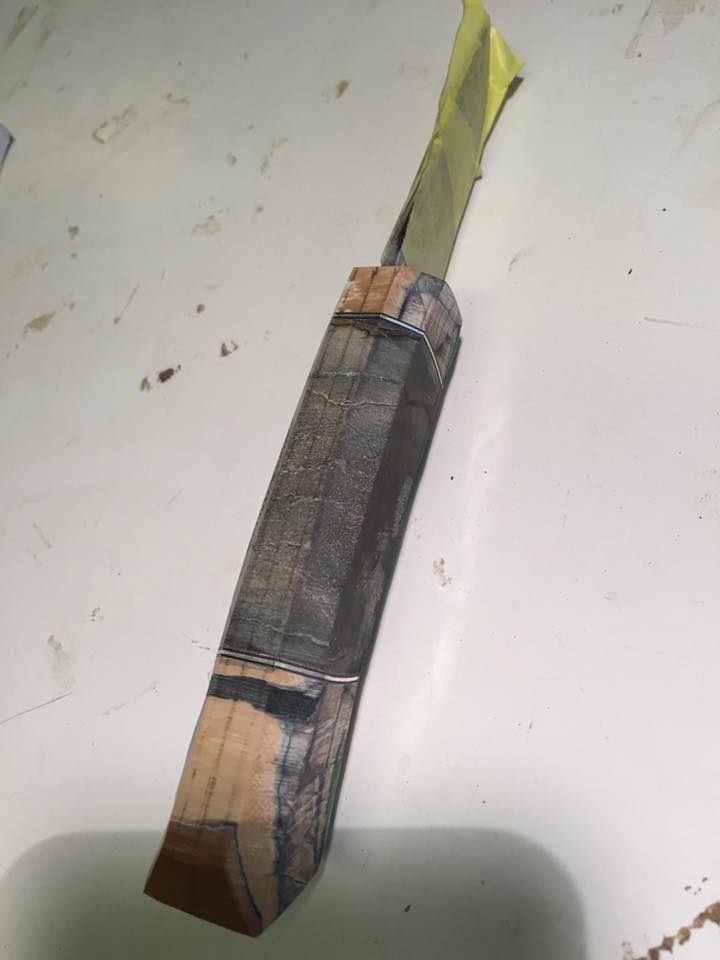
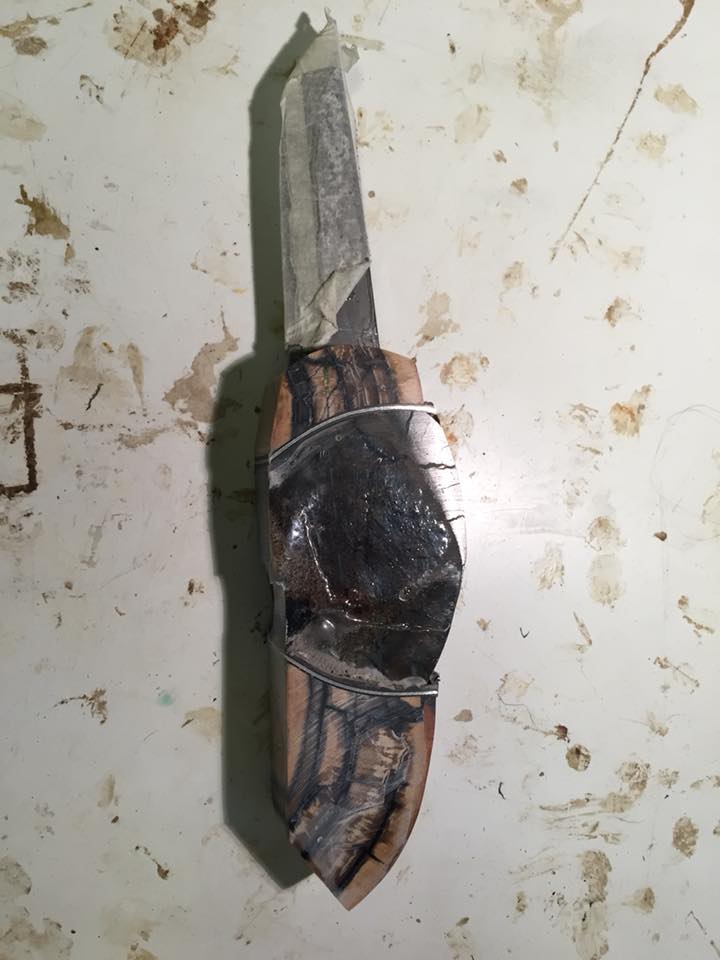
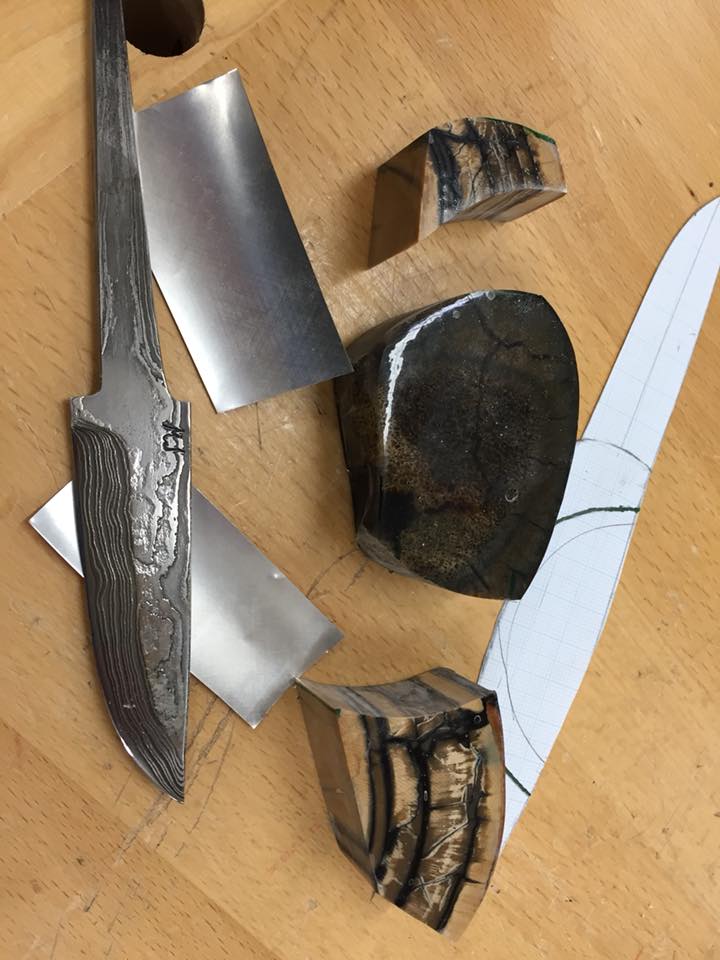
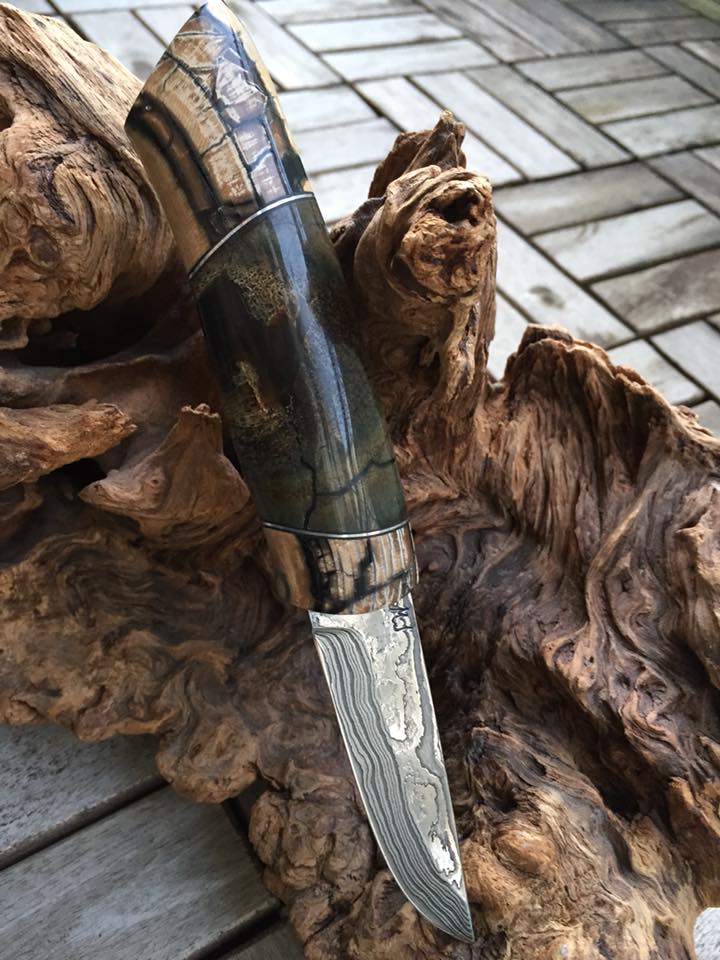
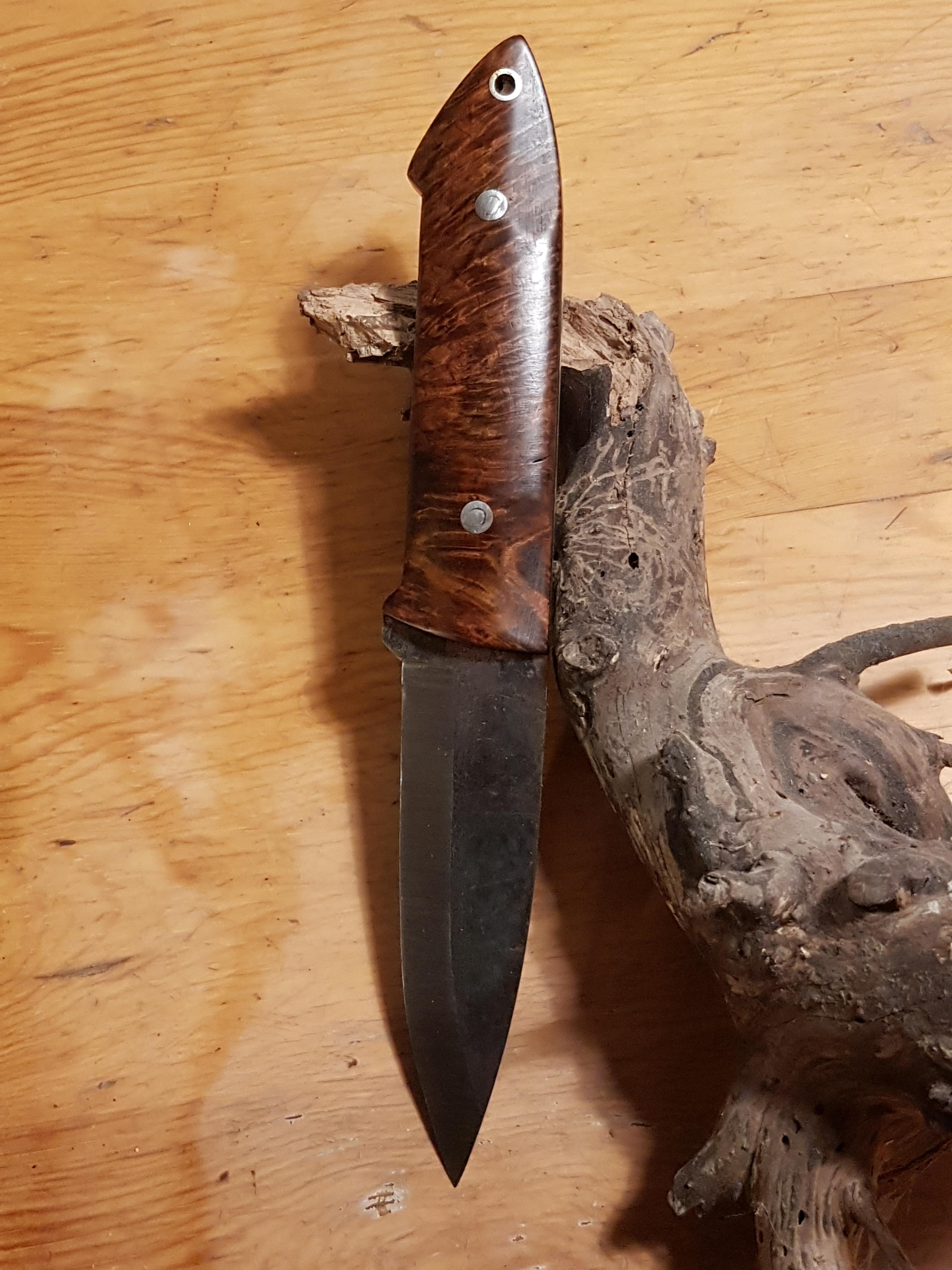
1 point 1 pointFår väl slänga in några bilder på bäverknivar också när jag ändå är igång!


 1 point
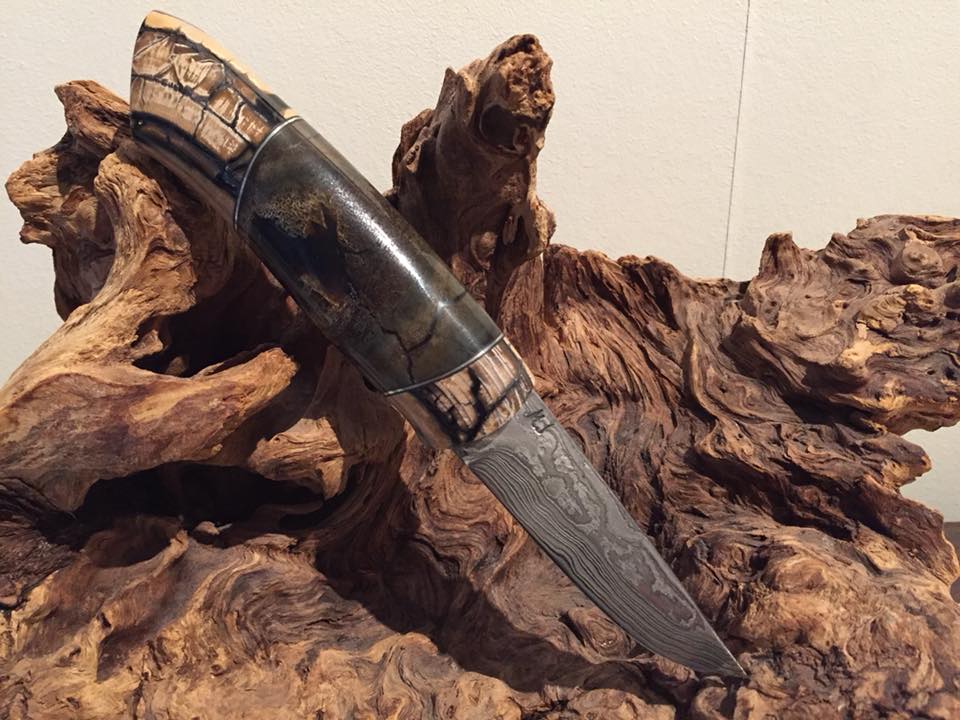
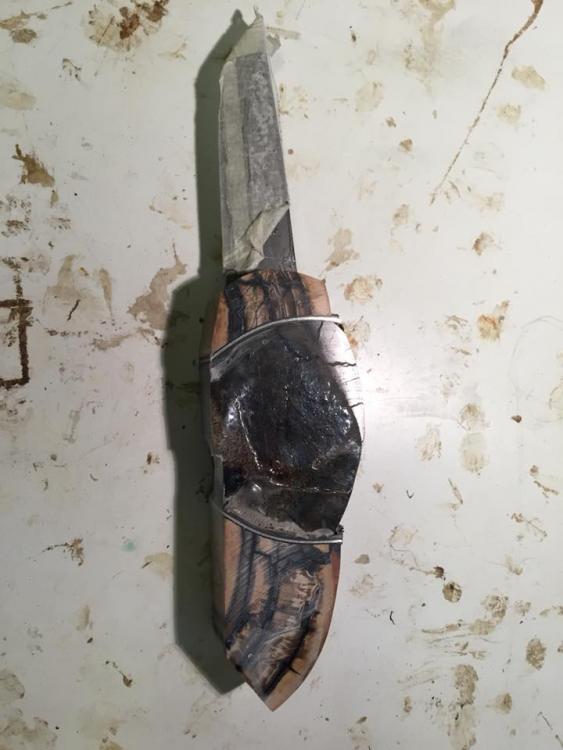
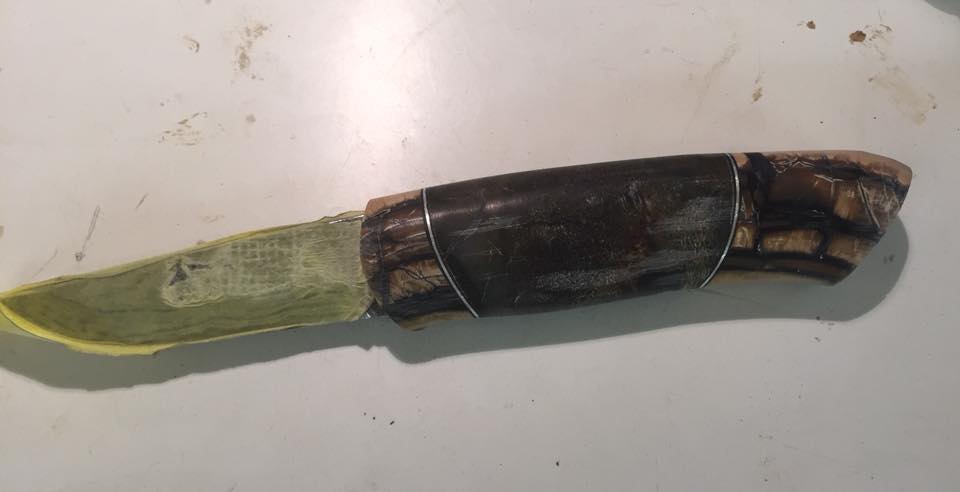
 1 pointEn av roligaste knivarna jag gjort och efter ganska många timmars arbete med sandpapper och avslutning med 12000 MicroMesh är kniven klar. Bladet är smitt av mästersmeden Magnus Jönsson och är gjort av järnmeteorit från Muonioalusta i Norra Sverige. Tros att denna meteorit slog ner på jorden för ca 200 000 år sedan och att järnet i sig kommer från rymden och är ca 4,7 miljarder år gammalt. Front- och bakre biten är stabiliserad mammutbete Mitt-biten är ett fossilt ben från noshörning och arten är ullhårig noshörning, en nu mera utdöd art.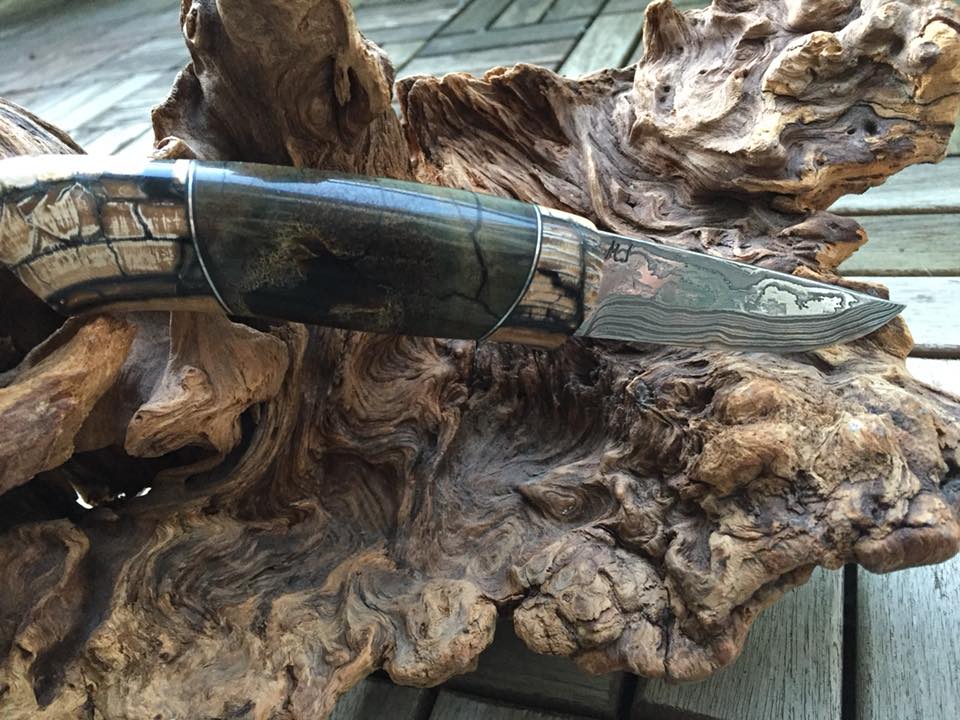



 1 point
 1 point
 1 point
 1 pointStövare och terrier. Om du är ute efter resultat. Är du intresserad av hundsport och klocka drevtider så struntar du i terriern Det är nog svårt att bedriva ensam jakt och räkna med att få skjuta allt för ofta. En stövare, några kompisar som kan marken väl och en terrier att stoppa ner när det går i gryt det är grejer det!1 point
 Ingen fara Hip, det är bara ett enkelt fall av Kamelåså!1 point
Då så- lite mer än två år sedan trådstart, helt inom rimliga gränser. jag har haft och sålt en passande stock till detta projekt, den är åter hos dess ursprungliga ägare, så den cirkeln är sluten. Nu har jag en nu stock på G från McMillan, den är mellan Arlanda och hemma så att säga, att hämtas ut inom kort. Pipan, brotsch, mynnningsbroms/dämp är klart, hylsor, svarv till hylshalsar, krut, kulor, fäste, allt är klart och för handen. Det kan vara dags att faktiskt engagera smeden i detta. För övrigt kan jag då för de som är roade av sådant, försöka att förmå smeden att göra inpassning av två nya pipor, 6,5 Saum, 260 Rem samt ompassa in min gamla 6,5x47L från Sakon till Pierce lådan, så att jag därefter får nya eller bättre beg pipor till alla mina riggar. Vilken stock det blev? Jo det blev en Mcmillan Game Scout för T3 lådan, det är ett måste att äga och utvärdera en sådan, men utöver det så kan jag vidare meddela att jag har funnit att det kommer att bli bra och vara ett relativt enkelt arbeta att passa in och bädda ner T3:an i min gamla Sako 591 kolv, vilket medför att den pangen kommer att ha två stockar, en för banskytte/plåtlek och en för jakt där vikt faktiskt har betydelse. Med tilltagande ålder har jag kommit att tröttna på halvmesyrer, så bli inte förvånade om det dyker upp lite saker till salu efterhand, jag har helt enkelt inte tid att leka tillräckligt mycket med dem. /Christian1 point
Ingen fara Hip, det är bara ett enkelt fall av Kamelåså!1 point
Då så- lite mer än två år sedan trådstart, helt inom rimliga gränser. jag har haft och sålt en passande stock till detta projekt, den är åter hos dess ursprungliga ägare, så den cirkeln är sluten. Nu har jag en nu stock på G från McMillan, den är mellan Arlanda och hemma så att säga, att hämtas ut inom kort. Pipan, brotsch, mynnningsbroms/dämp är klart, hylsor, svarv till hylshalsar, krut, kulor, fäste, allt är klart och för handen. Det kan vara dags att faktiskt engagera smeden i detta. För övrigt kan jag då för de som är roade av sådant, försöka att förmå smeden att göra inpassning av två nya pipor, 6,5 Saum, 260 Rem samt ompassa in min gamla 6,5x47L från Sakon till Pierce lådan, så att jag därefter får nya eller bättre beg pipor till alla mina riggar. Vilken stock det blev? Jo det blev en Mcmillan Game Scout för T3 lådan, det är ett måste att äga och utvärdera en sådan, men utöver det så kan jag vidare meddela att jag har funnit att det kommer att bli bra och vara ett relativt enkelt arbeta att passa in och bädda ner T3:an i min gamla Sako 591 kolv, vilket medför att den pangen kommer att ha två stockar, en för banskytte/plåtlek och en för jakt där vikt faktiskt har betydelse. Med tilltagande ålder har jag kommit att tröttna på halvmesyrer, så bli inte förvånade om det dyker upp lite saker till salu efterhand, jag har helt enkelt inte tid att leka tillräckligt mycket med dem. /Christian1 point Tufft här med. Stödutfodringen gör ju mycket nytta men svårt att hålla dom från vägarna. 15 viltolyckor med rå denna vinter runt området trösten är att foderplatserna är välbesökta ändå men det har tullat på stammen0 pointsThis leaderboard is set to Stockholm/GMT+02:00




Account
Navigation
Sök
Configure browser push notifications
Chrome (Android)
- Tap the lock icon next to the address bar.
- Tap Permissions → Notifications.
- Adjust your preference.
Chrome (Desktop)
- Click the padlock icon in the address bar.
- Select Site settings.
- Find Notifications and adjust your preference.
Safari (iOS 16.4+)
- Ensure the site is installed via Add to Home Screen.
- Open Settings App → Notifications.
- Find your app name and adjust your preference.
Safari (macOS)
- Go to Safari → Preferences.
- Click the Websites tab.
- Select Notifications in the sidebar.
- Find this website and adjust your preference.
Edge (Android)
- Tap the lock icon next to the address bar.
- Tap Permissions.
- Find Notifications and adjust your preference.
Edge (Desktop)
- Click the padlock icon in the address bar.
- Click Permissions for this site.
- Find Notifications and adjust your preference.
Firefox (Android)
- Go to Settings → Site permissions.
- Tap Notifications.
- Find this site in the list and adjust your preference.
Firefox (Desktop)
- Open Firefox Settings.
- Search for Notifications.
- Find this site in the list and adjust your preference.